


WDW Food&Wine
4.651.00 Reviews
App Specs
- Version
- 1.1.7
- Updated On
- License
- Free
- Downloads
- 50,000+
- Developer
- Small World Code, LLC
- Categories
- Food & Drink
- Platform
- Android
Screenshots
 Analysis by AppCompare
Planning a day around Epcot’s food festival can become surprisingly messy. I usually begin with a vague idea of trying a few dishes, then end up comparing menus, remembering what I liked, and trying not to lose track of spending or favorites. WDW Food&Wine is designed for that exact situation: it works as a personal Epcot Food Festival Passport rather than as a general restaurant-discovery service.
After using it as a dedicated food-and-drink companion, I found its appeal easy to understand. It gives the festival its own focused space, so the experience feels less like searching through unrelated restaurant apps and more like carrying a small tasting record with you. The app is free, aimed at Everyone, and comes from Small World Code, LLC. Its current version is 1.1.7, and it has built a solid audience with a 4.6 average from over a hundred ratings and more than fifty written reviews.
That does not make it essential for every visitor. If you only want a map, a broad Disney planning tool may be more useful. If you want a detailed food blog with extensive photography and long-form reviews, this is probably too focused. But for someone who wants to turn festival stops into an organized, personal checklist, the app has a clear purpose and a practical workflow.
From a loose food plan to a usable festival passport
I found the passport format most useful when I treated it as a flexible shortlist rather than a promise to try everything. Before heading out, I’d pick a few priorities and leave room for appetite, queues, and unexpected discoveries; that makes the day easier to adjust without losing track of what matters. A short, realistic plan also gives companions a clear starting point for choosing what to share.
Starting with the problem the app actually solves
The first useful decision is recognizing what this app is not. It is not a replacement for every travel-planning tool on a Disney trip, and I would not use it as my only source for transportation, park strategy, reservations, or general attraction planning. Its value begins when food booths and festival sampling become a separate project.
That narrow focus is a strength. Instead of making me sort through a large collection of unrelated park information, WDW Food&Wine keeps attention on the festival experience. I can approach the day with a simple question: which items do I want to try, and what do I want to remember afterward?
That distinction matters for different kinds of visitors. A first-time guest who has never considered making a food itinerary may appreciate the passport concept because it turns an overwhelming collection of choices into something more approachable. A returning visitor who already knows the booths may use it less as a discovery tool and more as a record of the day.
Worth Reading Before You Choose

EA SPORTS FC Mobile 26 Is a Bigger Football Game, but It Takes Time

Flipboard Shows What News Apps Must Do Beyond the Feed

Switching to Android Auto Means Rethinking Your Driving Routine

Google Calendar Makes a Crowded Week Easier to Manage

Ludo King Makes the Most of the Minutes Between Plans

Baby Panda World Brings Quick Play to Modern Phones, but Its Game Library Feels Busy
I also think it suits groups better than people might expect. In a family or group of friends, everyone can have different priorities. One person may want desserts, another may be looking for savory dishes, and someone else may simply want to keep a record of what the group sampled. A dedicated passport gives the conversation a shared reference point without forcing everyone to follow the same route.
Preparing before arriving at Epcot
The best time to open the app is before the day becomes busy. At home, I can look through the festival choices with a calmer mind and decide whether I want a short tasting route or a broader list. That small preparation step changes the app from a passive reference into a planning aid.
My practical approach would be to create three mental groups: definite choices, possible choices, and items that can wait. I would not try to commit to every option at once. Food festivals are affected by appetite, walking distance, queues, weather, and the rest of the park day. A passport is more useful when it supports flexible decisions instead of creating another obligation.
There is also a useful trade-off here. A longer list can make the trip feel exciting, but it can encourage overplanning. I prefer using the app to identify priorities, then leaving space for spontaneous choices. That way, the app helps me avoid forgetting a favorite without turning the visit into a rigid schedule.
For a couple, I would use the planning stage to divide tasting responsibilities. Rather than ordering duplicate portions, we could decide which items are most worth sharing and which ones each person wants individually. For a family, I would mark the dishes most likely to suit different tastes before entering the park. This is one of the less obvious benefits of a passport format: it supports conversation and coordination, not just memory.
Using it while moving through the festival
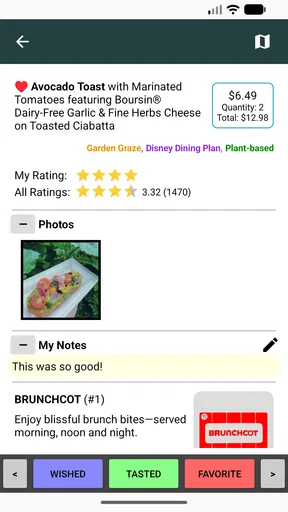
Once inside Epcot, the workflow becomes more practical. I would keep the app available as a quick reference while moving between booths, checking the next planned stop and updating the passport after eating. The important habit is to record the experience soon after trying each item, while the details are still fresh.
That timing makes a difference. If I wait until the end of the day, several dishes can blur together, especially when the visit includes multiple tastings. A short note made immediately after a stop is more reliable than trying to reconstruct the entire route later. Even a simple judgment such as “worth repeating,” “good but filling,” or “not for me” can be valuable on a future visit.
I would also use the app as a pacing tool rather than treating it as a race. A passport can tempt visitors to chase completion, but the better outcome is discovering what they genuinely enjoy. If a rich dish leaves me full, the next planned stop may need to wait. If a booth has a long queue, I can move to another priority and return later instead of letting one stop control the whole afternoon.
This is where the app’s focused design feels more useful than a general notes application. A blank notes page requires me to build the structure myself. WDW Food&Wine starts from the festival context, so the act of checking items off or recording impressions feels connected to the visit rather than like administrative work.
The handoffs between planning, eating, and remembering
The most important handoff is between the person who plans the route and the people who actually taste the food. In a group, the planner may know the list, but another person may be carrying the phone, ordering the item, or deciding whether the group should continue. A passport works best when everyone understands that it is a shared record, not one person’s private itinerary.
I would agree on a simple routine before entering the park: one person keeps track of the next stops, while whoever tries a dish gives a quick opinion for the record. This avoids the common problem of reaching the end of the day with a list of completed items but no memory of which ones were favorites.
Another handoff occurs between the app and the rest of the trip. WDW Food&Wine can organize the food portion, but it does not replace judgment about park hours, attraction plans, rest breaks, or the needs of children and older travelers. I would use it alongside the broader plan, not allow it to dictate the entire day.
For someone managing dietary preferences, the handoff requires extra care. I would treat the app as a way to organize choices, then confirm current ingredient and preparation details with the appropriate cast member before ordering. A passport can help me remember what I wanted to investigate, but it should not be treated as a substitute for direct dietary questions.
Turning a tasting day into a useful result
The immediate result is a more coherent festival visit. Instead of wandering until something looks appealing, I can make intentional stops and still change direction when circumstances demand it. That balance is the main reason I would recommend trying the app to a friend who enjoys food-focused park days.
The longer-term result is even more personal. A completed passport can become a memory aid for a future trip. I may remember that a dish was enjoyable, disappointing, too heavy for the middle of the day, or especially good when shared. Those details are more useful than a generic list of popular items because they reflect my own preferences.
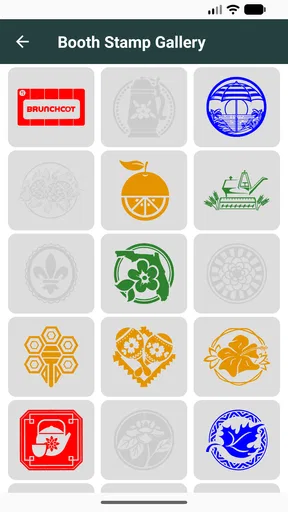
There is a subtle advantage in separating “tried” from “liked.” Many people confuse completion with satisfaction. A passport encourages me to acknowledge what I sampled, but I can still make an honest distinction between an item I wanted to experience and one I would actively seek again. That makes the record more valuable than a simple checklist.
I would also use the finished record when talking with friends who are visiting later. Instead of giving them an unfiltered list, I could explain which stops suited a quick snack, which were better for sharing, and which did not justify rearranging the day. That kind of personal guidance is where a focused festival app can outperform broad travel content.
Where the workflow becomes less comfortable
The biggest limitation is the app’s narrow scope. Its focus is helpful when I am thinking about the food festival, but it becomes less useful when I need the rest of a Disney day organized in the same place. Switching between a festival passport, a general park app, maps, reservations, and personal notes can create friction.
That separation may not bother a visitor who enjoys dedicated tools. For someone who wants one comprehensive itinerary, it can feel like extra work. I would skip this app if my main goal were an all-purpose Epcot guide, because the focused passport format would not cover enough of the surrounding trip to justify replacing a broader planning solution.
There is also a behavioral limitation: the passport concept works best when I remember to update it. If I leave every entry until later, the app loses some of its practical value. This is not a flaw unique to this product, but it is especially relevant here because the whole experience depends on connecting a real tasting with a personal record.
Another point is that food preferences are highly individual. A dedicated festival companion can help me organize choices, but it cannot decide whether a dish is worth trying for my particular palate. I would still read the available descriptions carefully, consider portion sharing, and leave room to change plans after the first few stops.
Visitors who dislike tracking experiences may find the passport idea unnecessary. If I prefer to walk freely, choose whatever catches my eye, and forget the details afterward, the app may add more structure than I want. In that case, a general park app or no food-planning tool at all could be the better choice.
How it compares with usual alternatives
The most obvious alternative is a general Disney planning app. That option is stronger when I need a wide view of the park, including attractions and other logistics. WDW Food&Wine is stronger when the food festival itself is the center of attention and I want a dedicated record rather than another large information hub.
A notes app is more flexible, but it starts empty. I would have to create headings, copy information, decide how to organize completed items, and remember where the notes belong. The passport approach reduces that setup burden and gives the food day a defined shape. The trade-off is that a notes app can be adapted to anything, while this app is intentionally specialized.
Social media and food blogs can provide more personality, photos, and outside opinions. They may be better for inspiration before a trip, especially when I want to compare reactions from many visitors. WDW Food&Wine serves a different purpose: it keeps my own festival workflow together while I am making decisions and tasting items.
A paper checklist is still a legitimate competitor. It works without a battery, is easy to share, and can feel satisfying to mark by hand. The app becomes more appealing when I want a digital record that stays with the rest of my phone-based trip planning. Choosing between them depends less on features than on how I naturally keep track of experiences.
Who will get the most from it
I would recommend WDW Food&Wine to visitors who see festival eating as one of the main attractions of their Epcot day. It is particularly suitable for people who like sampling several items, comparing favorites, and returning to the same event on future trips. Couples and small groups can also benefit from using it as a shared tasting plan.
It is a good fit for a first visit when the number of choices feels distracting. A little preparation can prevent the day from becoming a series of random decisions. It is also useful for repeat visitors who want to avoid relying entirely on memory when deciding what to revisit.
I would be more cautious about recommending it to someone whose visit is centered on rides, character experiences, or a tightly timed itinerary. Food may be incidental for that traveler, and a general park tool will probably provide more value. The same applies to anyone looking for detailed nutrition guidance, reservation management, or a complete travel itinerary.
Device fit, cost, and the practical decision
The app is free, which makes experimenting with it easy. I can install it for a single festival visit without having to justify another paid travel purchase. Its age rating is Everyone, so it is suitable as a family-oriented companion, although adults will still be the ones making the final decisions about ordering and dietary questions.
It requires iOS 11 or later, so anyone using an older Apple device should check compatibility before building a plan around it. That requirement is worth considering before the trip rather than discovering it at the park entrance. On a compatible device, I would install it before leaving home, open it once, and make sure I understand how I want to use the passport before the day becomes crowded.
The app was released on March 3, 2018, and the current version is 1.1.7. Those details suggest a product with a defined, established purpose rather than a broad platform trying to cover every travel need. I would judge it on that basis: not by whether it replaces every other tool, but by whether it makes festival food decisions and memories easier to manage.
My final take after following the full workflow
WDW Food&Wine works because it gives a specific problem a specific shape. I can start with an uncertain list of dishes, turn that list into a flexible route, coordinate choices with companions, record what I actually tried, and finish with a personal reference for the next visit. That complete path is more useful than the short store summary might suggest.
The app is not the right answer for every Epcot visitor. It does not replace a broad park guide, a map, or direct conversations about dietary needs. Its value depends on participating in the passport process, and visitors who prefer completely spontaneous eating may find the structure unnecessary.
For me, the deciding factor is focus. When food is a meaningful part of the day, a dedicated passport keeps the experience from disappearing into a larger travel plan. If you want to taste with a plan but still leave room for surprises, this free Food & Drink app is worth adding to your Epcot toolkit.
My recommendation is strongest for food-minded travelers, returning guests, and groups that want a shared record of their festival stops. I would skip it only when the food festival is a minor detail or when I need one app to manage the entire Disney trip. Used for its intended job, it is a pleasantly focused companion from the first planned bite to the final remembered favorite.
Pros
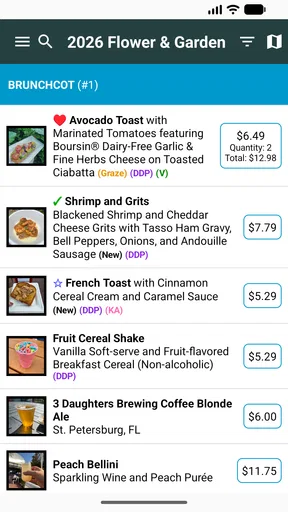
- Menus and festival offerings are easy to browse in one place.
- Useful for comparing dishes before walking around the festival.
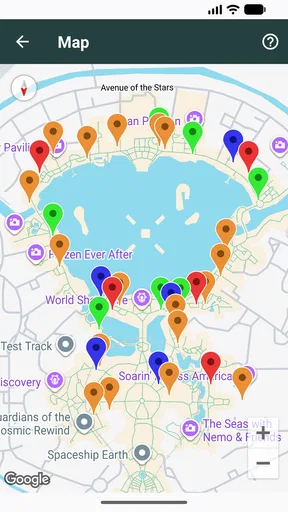
- Helps identify food booths and locations across the event.
- Seasonal information makes planning a visit more convenient.
- Good companion for guests focused on tasting and dining experiences.
Cons
- Content may become outdated when menus or booth hours change.
- Some features may be less useful outside the festival dates.
- Food prices can make planning difficult for budget-conscious visitors.
- Requires internet access for the most current event information.
- Coverage may be limited compared with Disney’s main official app.
FAQs for WDW Food&Wine
What is WDW Food&Wine, and who is it designed for?
WDW Food&Wine is a companion app focused on food and beverage experiences at Walt Disney World, particularly for guests interested in restaurants, snacks, festivals, and seasonal offerings. It can be useful for first-time visitors who need ideas and for returning guests who want to plan meals more efficiently. The app is most valuable when used as a planning and discovery tool rather than as a replacement for official Disney reservations or park information.
Can WDW Food&Wine help me find restaurants and festival food offerings?
Yes, the app is intended to help users discover dining options and food-related experiences across Walt Disney World. Depending on the available content and current updates, you may find restaurant suggestions, menus, snack recommendations, festival booths, featured dishes, and other culinary highlights. Availability, prices, menus, and operating locations can change frequently, so it is wise to confirm important details through official Disney sources before visiting.
Does WDW Food&Wine allow users to make dining reservations or place mobile orders?
WDW Food&Wine may provide information and links that support dining planning, but users should not assume that every restaurant reservation or mobile-order feature can be completed directly inside the app. Disney dining reservations, waitlists, and mobile ordering are generally managed through official Disney services and may require a Disney account. Before relying on the app, check whether a particular option redirects you to an official booking or ordering platform.
Is WDW Food&Wine free to download, and are there any additional costs?
The app may be available to download without an upfront charge, but the exact pricing model can depend on the version, platform, region, or optional features. Any purchases made through the app, such as premium content, should be reviewed carefully before confirming payment. The larger costs associated with using the app are usually the real-world expenses of park admission, transportation, restaurant meals, festival items, and other Walt Disney World activities.
How accurate and current is the information in WDW Food&Wine?
Food and festival information at Walt Disney World changes often because restaurants adjust menus, prices, hours, seasonal offerings, and availability. WDW Food&Wine can be helpful for ideas and preliminary planning, but no third-party guide should be treated as permanently authoritative. Check the app’s update date when possible and verify critical details, including allergen information, reservation requirements, operating hours, and current prices, through official Disney channels before making plans.


